Provider documentation
How to set up CopyBridge, from registration to your first followers.
Quick Start
Register account → Get Master EA → Set up → Add followers. Complete setup in 30 minutes.
Get Started →Master EA
Download, install in MT5, configure API key, and start transmitting your trades.
Install EA →Whop Integration
Set up payments, configure webhooks, and automate follower management completely.
Setup Payments →Quick Start
30-Minute Setup Checklist
Your trades are captured by the Master EA and automatically copied to your followers' accounts within about 2 seconds.
Master EA Installation
Prerequisites
- • MetaTrader 5 installed
- • Active trading account with your preferred broker
- • Windows VPS or PC running 24/7
- • Stable internet connection
Installation Steps
- 1. Download Master EA from dashboard
- 2. Copy to MT5 MQL5/Experts/ folder
- 3. Restart MetaTrader 5
- 4. Configure with your master key
- 5. Enable live trading and DLL imports
Important Configuration
The Master EA must run 24/7 to capture all your trades. Any downtime means followers won't receive those trades. Use a reliable VPS for best results.
Whop Integration
Why Whop?
Forex-Friendly
Explicitly allows trading signals (unlike Stripe/PayPal)
Global Payments
Cards, PayPal, crypto supported worldwide
Low Fees
3% + processing (vs 20-50% on other platforms)
Auto-Billing
Recurring subscriptions with dunning management
Automated Setup via CopyBridge (Recommended)
CopyBridge can automatically create your Whop product, pricing plans, and webhook. You just need to provide a temporary API key.
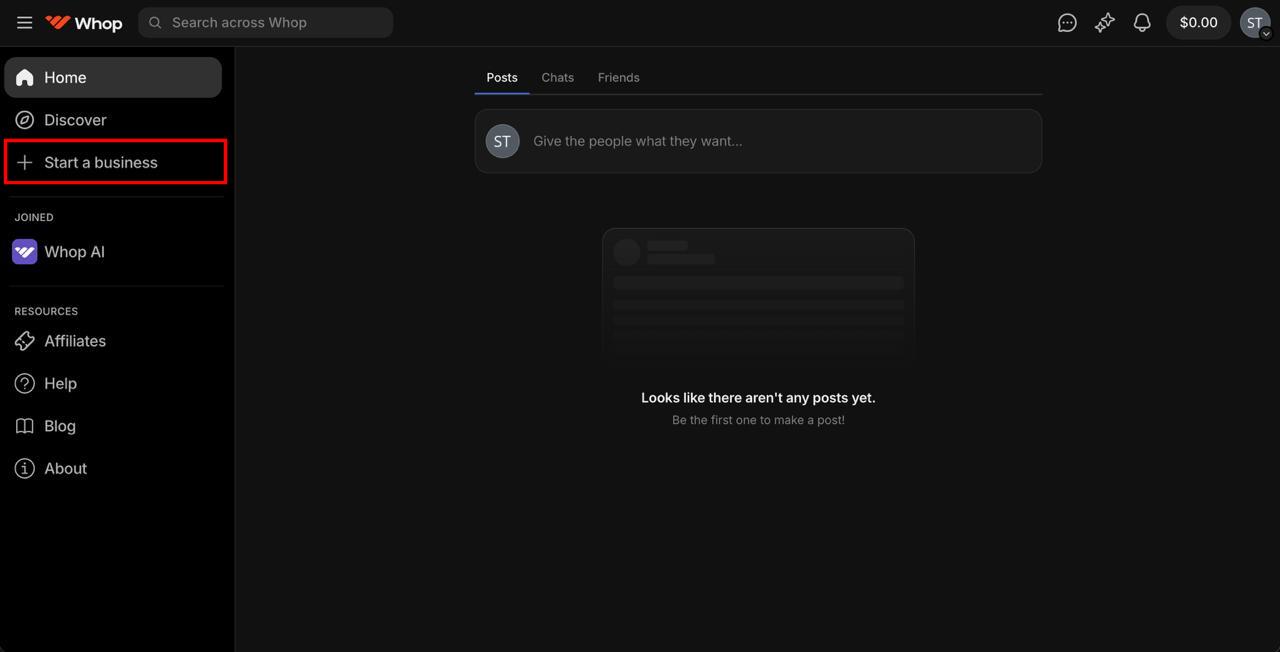
Log in to whop.com and click "Start a business" in the sidebar
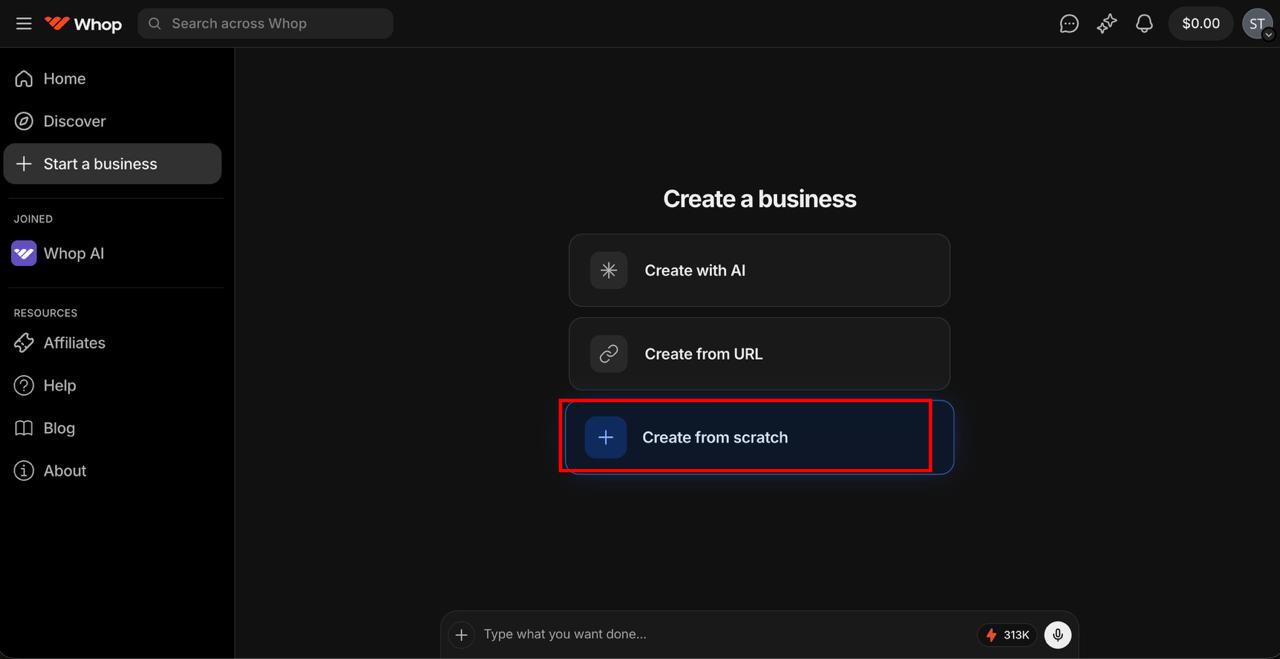
Select "Create from scratch"
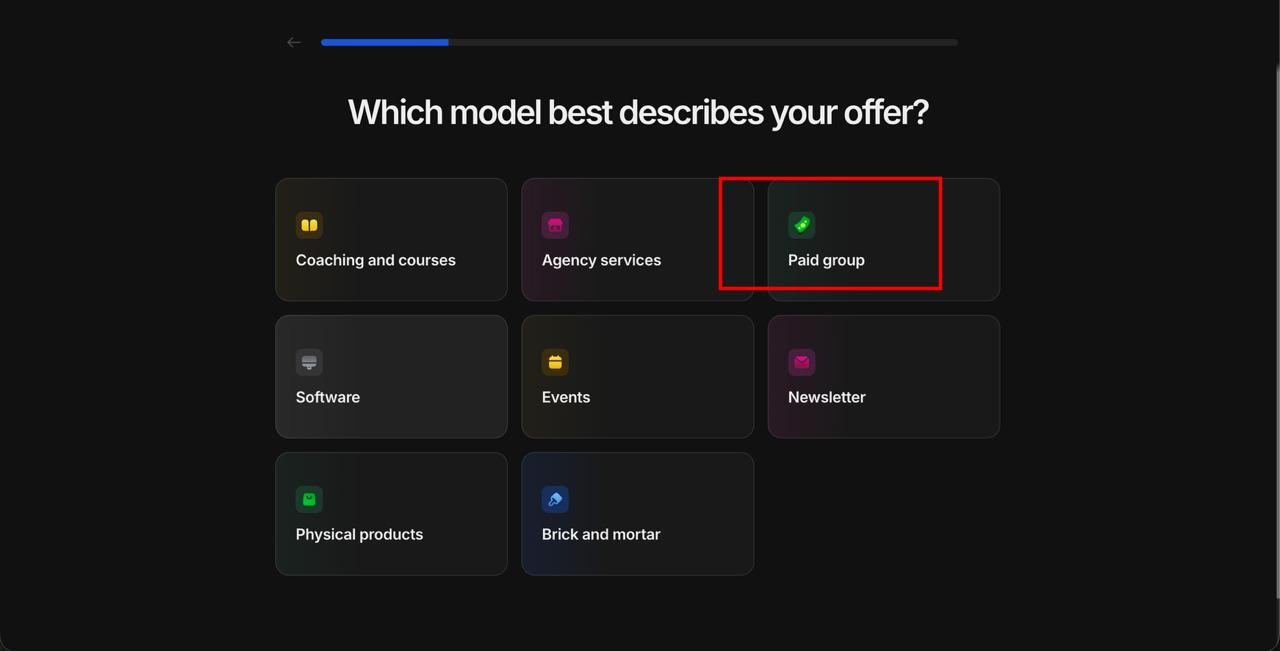
Choose "Software" as your business model
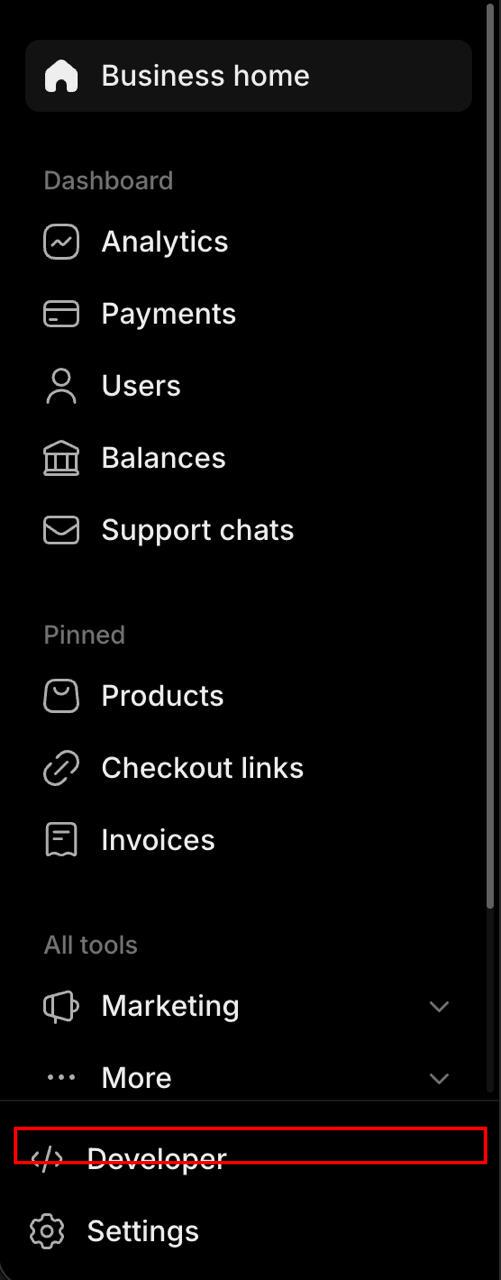
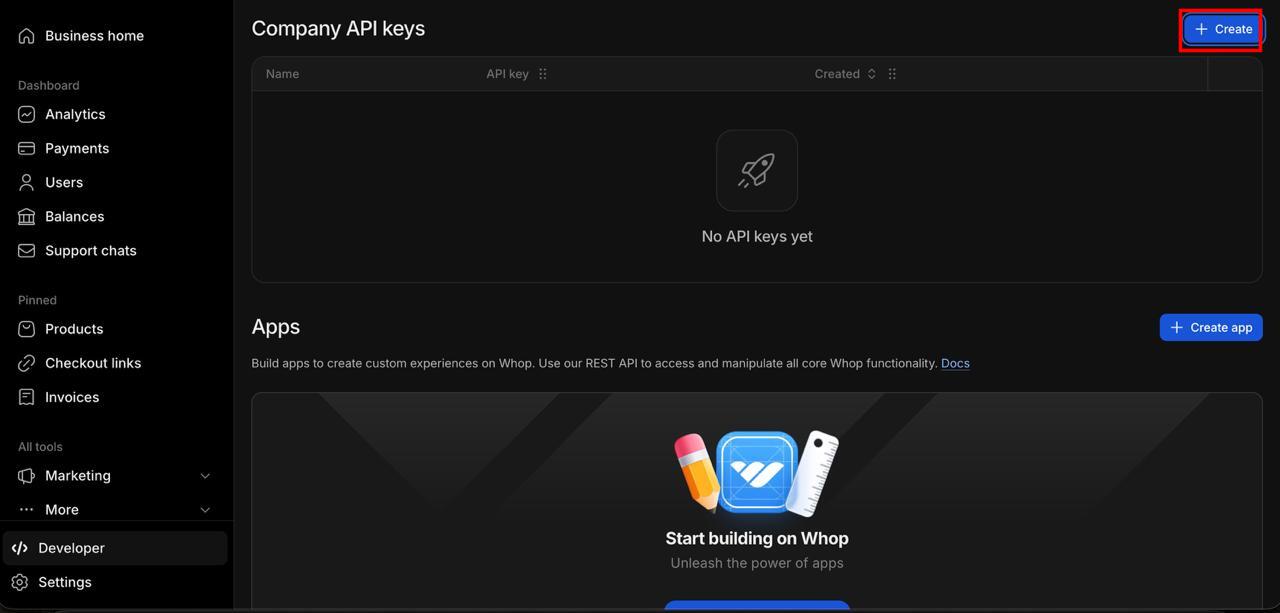
Once your business is created, click "Developer" in the sidebar
Click "+ Create" to create a new API key
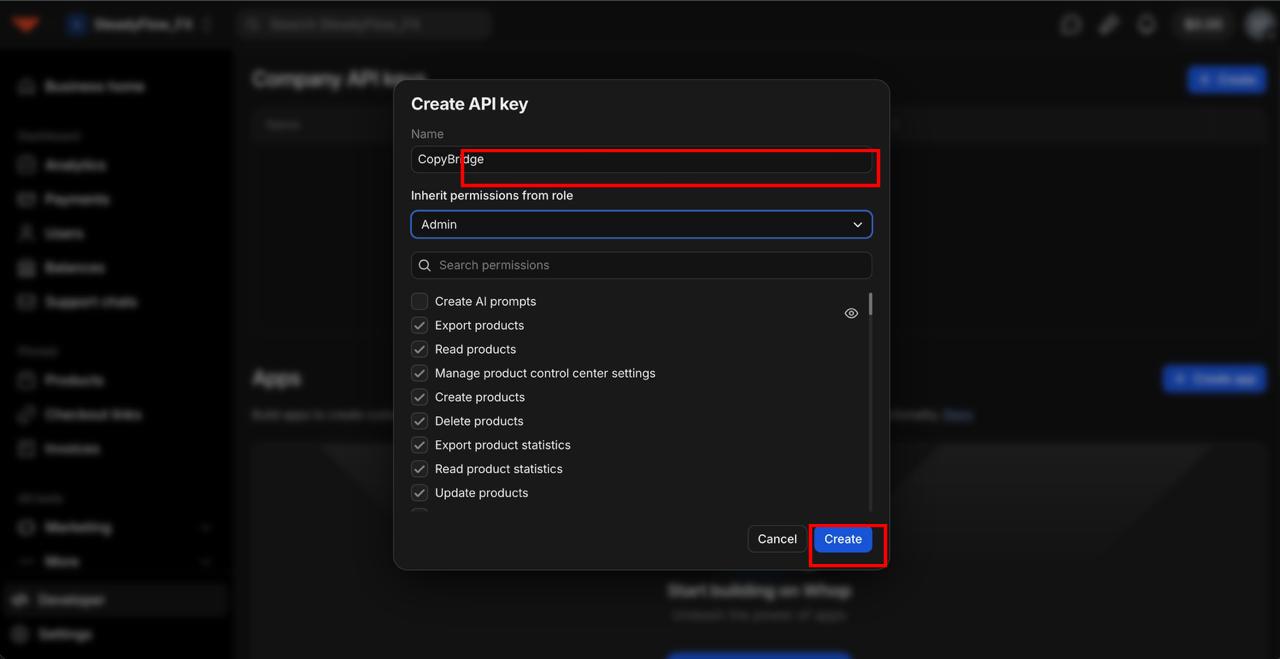
Name it "CopyBridge" — select "Admin" role — click "Create"
The role dropdown shows "Admin" by default, but you must click and actively select it from the list for permissions to apply correctly.
Click "Copy API key" to copy it
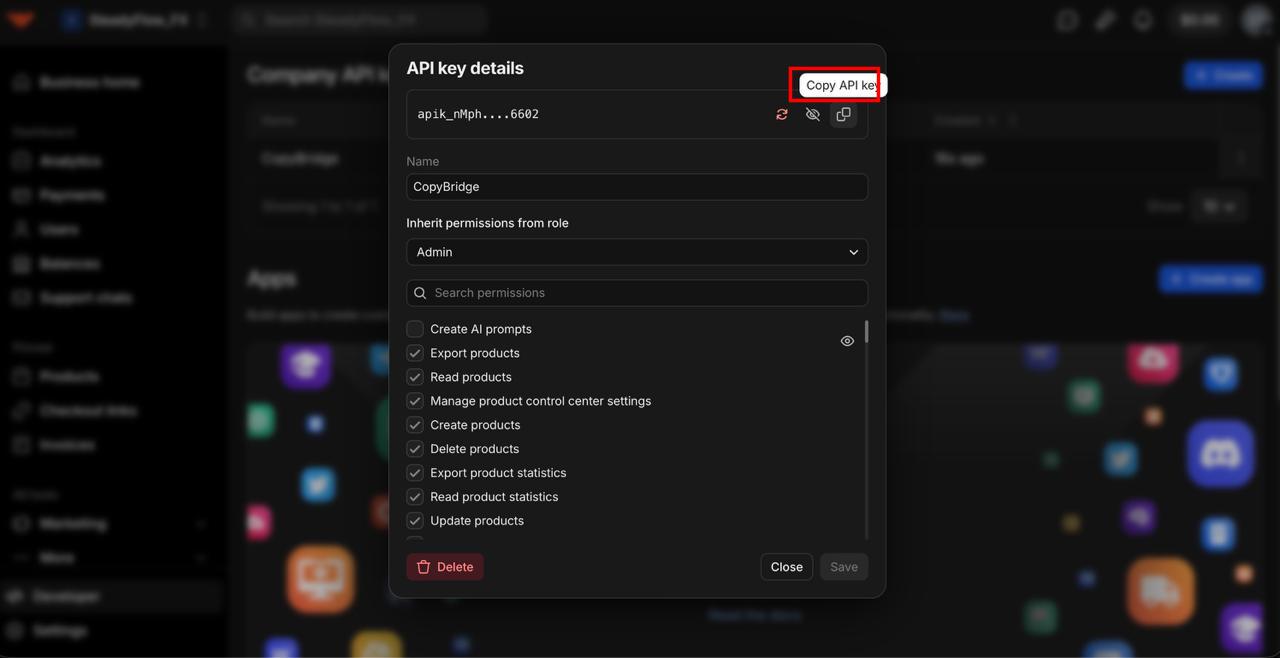
Paste in CopyBridge Dashboard
Go to your CopyBridge Dashboard → Whop Setup, paste the API key, set your pricing, and click "Create My Whop Store".
Important Notes
- • Delete your API key after setup! Go to Whop Developer → Company API Keys → find "CopyBridge" → click Delete. CopyBridge never stores your key, but you should remove it for security.
- • Webhooks cannot be created via the API. After automated setup, you'll need to manually create a webhook in Whop Developer → Webhooks
- • Webhook URL: shown in your CopyBridge dashboard after setup
- • Events to enable:
membership_activated,membership_deactivated
Or set up manually:
Step 1: Create Whop Product
Set up your signal service as a monthly subscription product on Whop.
Title: [Your Name] Forex Copy Trading
Category: Trading & Signals
Price: $99/month (your choice)
Billing: Monthly recurring
Step 2: Configure Webhook
Connect Whop to CopyBridge for automatic follower management.
URL: https://api.copybridge.io/api/v1/webhooks/provider/[YOUR_ID]
Events: membership.went_valid, membership.went_invalid
Secret: [Copy from Whop to CopyBridge dashboard]
API Reference
Authentication
CopyBridge uses three authentication methods depending on the caller:
X-API-Key: [master_key]Used by the Master EA to submit trades and balance updates. The master key is generated on registration and can be viewed/regenerated in the dashboard.
Authorization: Bearer [JWT_TOKEN]Used by the provider dashboard. Obtained via the login endpoint. Tokens expire after 7 days.
X-Subscriber-Key: [subscriber_key]Used by the Copier EA to poll for trades. Each follower receives a unique subscriber key.
Some endpoints accept either X-API-Key or X-Subscriber-Key (e.g. trade polling, status).
Developer Quickstart
Integrate CopyBridge from your own backend in four steps. All requests are JSON over HTTPS to https://api.copybridge.io.
1. Create a provider account (returns a JWT):
curl -X POST https://api.copybridge.io/api/v1/providers/register \
  -H "Content-Type: application/json" \
  -d '{"name":"My Service","email":"[email protected]","password":"StrongPass2026"}'
# → 201 { "token": "<JWT>", "provider": { "id": "...", "plan": "free", "max_followers": 2 } }
2. Get your master key (long-lived; used for trade ingest):
curl https://api.copybridge.io/api/v1/providers/me/master-key \
  -H "Authorization: Bearer <JWT>"
# → 200 { "master_key": "<uuid>" }
3. Push a trade from your master account:
curl -X POST https://api.copybridge.io/api/v1/trades \
  -H "Content-Type: application/json" \
  -H "X-API-Key: <master_key>" \
  -d '{"action":"OPEN","symbol":"EURUSD","type":"BUY","lots":0.1,"price":1.1,"ticket":123456}'
# → 201 created  (or 200 { "status": "duplicate" } on idempotent re-send)
4. Poll trades (followers' Copier EA does this automatically):
curl "https://api.copybridge.io/api/v1/trades?since_seq=0" \
  -H "X-API-Key: <master_key>"
# → 200 { "trades": [ { "seq": 1, "action": "OPEN", "symbol": "EURUSD", ... } ], "count": 1 }
Rate Limits
All limits are per IP address (not per key). Call the API server-side from a stable IP.
- Global: 200 requests per minute across all
/api/endpoints. - Auth endpoints (
/api/v1/providers/registerand/api/v1/providers/login): 10 requests per 15 minutes.
Exceeding a limit returns HTTP 429. Implement exponential backoff and avoid logging in on every request — reuse the JWT (valid 7 days).
Provider Endpoints
POST /api/v1/providers/registerRegister a new provider account. Returns a JWT and the new provider row.
Auth: NoneBody
{ "name": "My Service", "email": "[email protected]",
  "password": "StrongPass2026" }
// Password: ≥10 chars, must contain uppercase, lowercase, and a digit
Example
curl -X POST https://api.copybridge.io/api/v1/providers/register \
  -H "Content-Type: application/json" \
  -d '{"name":"My Service","email":"[email protected]","password":"StrongPass2026"}'
Responses
201{ "token": "<JWT>", "provider": { "id", "name", "email", "plan", "max_followers", "active", "created_at" } }400name/email/password validation ·409email already registered ·500
POST /api/v1/providers/loginAuthenticate with email and password. Returns a JWT valid for 7 days.
Auth: NoneBody
{ "email": "[email protected]", "password": "StrongPass2026" }Example
curl -X POST https://api.copybridge.io/api/v1/providers/login \
  -H "Content-Type: application/json" \
  -d '{"email":"[email protected]","password":"StrongPass2026"}'
Responses
200{ "token": "<JWT>", "provider": { "id", "name", "email", "plan", "max_followers", "active" } }400"Email and password are required"·401invalid credentials or no password login ·403account inactive ·500
GET /api/v1/providers/meGet the authenticated provider's profile, plan, and settings.
Auth: Bearer JWTExample
curl https://api.copybridge.io/api/v1/providers/me \
  -H "Authorization: Bearer <JWT>"
Responses
200{ "id", "name", "email", "plan", "max_followers", "active", "billing_status", "allowed_symbols", "copy_fee_pct", "email_verified", "created_at", "updated_at" }401bad/missing token ·404provider not found ·500
PUT /api/v1/providers/meUpdate provider settings (name, allowed_symbols, copy_fee_pct).
Auth: Bearer JWTGET /api/v1/providers/me/statsAggregated trading performance: win rate, profit points, open positions, active followers.
Auth: Bearer JWTExample
curl https://api.copybridge.io/api/v1/providers/me/stats \
  -H "Authorization: Bearer <JWT>"
Responses
200{ "total_trade_events", "open_positions", "closed_trades", "winning_trades", "losing_trades", "win_rate", "total_profit_points", "symbols_traded", "active_followers" }401bad/missing token ·500
GET /api/v1/providers/me/master-keyRetrieve the current master API key (used to authenticate trade ingest).
Auth: Bearer JWTExample
curl https://api.copybridge.io/api/v1/providers/me/master-key \
  -H "Authorization: Bearer <JWT>"
Responses
200{ "master_key": "<uuid>" }401bad/missing token ·404provider not found ·500
POST /api/v1/providers/me/master-key/regenerateGenerate a new master key (invalidates the old one).
Auth: Bearer JWTTrade Endpoints
POST /api/v1/tradesIngest a trade event from your master account. Idempotent per (provider, ticket, action) for OPEN/CLOSE.
Auth: X-API-KeyBody
{ "action": "OPEN" | "CLOSE" | "MODIFY",
  "symbol": "EURUSD", "type": "BUY" | "SELL",
  "lots": 0.1, "price": 1.1, "ticket": 123456,
  "sl": 0, "tp": 0, "magic": 0, "timestamp": "ISO-8601 (optional)" }
Example
curl -X POST https://api.copybridge.io/api/v1/trades \
  -H "X-API-Key: <master_key>" -H "Content-Type: application/json" \
  -d '{"action":"OPEN","symbol":"EURUSD","type":"BUY","lots":0.1,"price":1.1,"ticket":123456}'
Responses
201trade created (returns the trade row:id, seq, action, symbol, type, lots, price, sl, tp, magic, ticket, timestamp, created_at)200{ "status": "duplicate" }— idempotent re-send400validation ·401bad/missing key ·403symbol/position cap ·429OPEN-rate cap
GET /api/v1/tradesPoll for new trade events. Use ?since_seq= (preferred) or ?since= (ISO timestamp) for cursor polling. /api/v1/trades/open and /api/v1/trades/snapshot share the same auth and trade-row shape.
Example
curl "https://api.copybridge.io/api/v1/trades?since_seq=0" \
  -H "X-Subscriber-Key: <subscriber_key>"
Responses
200{ "trades": [ { "id", "seq", "action", "symbol", "type", "lots", "price", "sl", "tp", "magic", "ticket", "timestamp", "created_at" }, ... ], "count": N }— up to 100 rows ordered by seq401bad/missing key ·500
GET /api/v1/trades/openList currently open master tickets (for ghost trade reconciliation).
Auth: X-API-Key or X-Subscriber-KeyGET /api/v1/trades/snapshotFull state snapshot with all open positions and max_seq (for initial sync on EA startup).
Auth: X-API-Key or X-Subscriber-KeyFollower Management
GET /api/v1/providers/me/followersList all followers with their status and subscriber keys.
Auth: Bearer JWTExample
curl https://api.copybridge.io/api/v1/providers/me/followers \
  -H "Authorization: Bearer <JWT>"
Responses
200{ "followers": [ { "id", "subscriber_key", "name", "email", "active", "created_at" }, ... ], "count": N }401bad/missing token ·500
POST /api/v1/providers/me/followersCreate a new follower manually. Returns the follower row including the unique subscriber_key for the Copier EA.
Auth: Bearer JWTBody
{ "name": "Alice Trader", "email": "[email protected]" }
// email is optional
Example
curl -X POST https://api.copybridge.io/api/v1/providers/me/followers \
  -H "Authorization: Bearer <JWT>" -H "Content-Type: application/json" \
  -d '{"name":"Alice Trader","email":"[email protected]"}'
Responses
201{ "id", "subscriber_key", "name", "email", "active", "created_at" }400name required ·403follower limit reached ·409email already exists for this provider ·500
PUT /api/v1/providers/me/followers/:idUpdate a follower's name or active status.
Auth: Bearer JWTBody
{ "name": "New Name", "active": false }
// Both fields optional; at least one required
Example
curl -X PUT https://api.copybridge.io/api/v1/providers/me/followers/42 \
  -H "Authorization: Bearer <JWT>" -H "Content-Type: application/json" \
  -d '{"active":false}'
Responses
200updated follower row:{ "id", "subscriber_key", "name", "email", "active", "created_at" }400no valid fields ·404follower not found ·500
DELETE /api/v1/providers/me/followers/:idPermanently remove a follower. Their subscriber key is invalidated immediately.
Auth: Bearer JWTExample
curl -X DELETE https://api.copybridge.io/api/v1/providers/me/followers/42 \
  -H "Authorization: Bearer <JWT>"
Responses
204deleted (no body)404follower not found ·500
Status & Balance
GET /api/v1/statusHealth check scoped to your provider: trade count, active followers, master balance, and last trade time.
Auth: X-API-Key or X-Subscriber-KeyExample
curl https://api.copybridge.io/api/v1/status \
  -H "X-API-Key: <master_key>"
Responses
200{ "status": "ok", "uptime": 3600, "trades": 42, "active_subscribers": 5, "master_balance": 10500.00, "last_trade": "2026-05-17T..." }401bad/missing key ·500
POST /api/v1/master-balanceMaster EA sends balance heartbeat.
Auth: X-API-KeyGET /api/v1/master-balanceGet provider's last reported balance (used by Copier EA for lot scaling).
Auth: X-API-Key or X-Subscriber-KeyGET /healthServer liveness probe. Returns {ok: true} when the API process is up. Not scoped to a provider.
Master State
GET /api/v1/providers/me/master-statusReturns the Master EA's connection state, derived from its most recent heartbeat. Response: {connected: boolean, last_seen: ISO-8601 | null}. connected is true if the last heartbeat is within the past 2 minutes.
POST /api/v1/master-balanceMaster EA heartbeat. Body: {balance, account_login?}. Updates the master_state heartbeat timestamp (which drives GET /me/master-status) and stores the latest balance. Enforces single-Master-EA per provider: returns 409 if a different account_login heartbeated within the last 2 minutes.
Webhook Configuration
GET /api/v1/providers/me/webhook-configView webhook URL and setup instructions.
Auth: Bearer JWTPUT /api/v1/providers/me/webhook-configSet the Whop webhook signing secret for signature verification.
Auth: Bearer JWTPOST /api/v1/providers/me/webhook-config/testCheck if webhook is properly configured.
Auth: Bearer JWTWebhooks (Inbound)
POST /api/v1/webhooks/provider/:providerIdWhop sends membership events here. Auto-creates/deactivates followers.
Auth: Whop webhook signatureOutbound Webhooks (for integrators)
Register one HTTPS URL in your dashboard and CopyBridge will POST signed events to it on every follower lifecycle change. Built for SaaS-integrators using CopyBridge as a copy-trading backend.
Events
follower.createdA new follower was added (via dashboard, Whop membership.went_valid, or any provider-specific path).
follower.deactivatedA follower was deactivated or removed (PUT active:false, DELETE, Whop membership.went_invalid).
Payload shape
{
  "id": "01HQXY...",                       // event UUID — matches webhook-id header
  "type": "follower.created",
  "created_at": "2026-05-21T19:00:00.000Z",
  "data": {
    "follower": {
      "id": "uuid-v4",
      "subscriber_key": "uuid-v4",         // the EA install key for this follower
      "name": "...",
      "email": "...",
      "active": true,
      "created_at": "2026-05-21T19:00:00.000Z"
    }
  }
}
Note: Only id is guaranteed on every event. Other fields (subscriber_key, name, email, created_at) may be absent on events sourced from Whop membership webhooks. Use id + webhook-id for lookup and idempotency.
Signature verification (Standard Webhooks)
Symmetric HMAC-SHA256, identical to Whop's inbound scheme. Any Standard Webhooks library verifies these out of the box. Manual verification (Node):
import { createHmac } from 'node:crypto';

function verifyCopyBridge(rawBody, headers, secret) {
  const id  = headers['webhook-id'];
  const ts  = headers['webhook-timestamp'];
  const sig = (headers['webhook-signature'] || '').replace(/^v1,/, '');
  const key = Buffer.from(secret.slice(6), 'base64'); // strip 'whsec_'
  const expected = createHmac('sha256', key)
    .update(`${id}.${ts}.${rawBody}`)
    .digest('base64');
  // Constant-time: a plain === leaks timing. timingSafeEqual throws on a
  // length mismatch, so check that first.
  const a = Buffer.from(sig), b = Buffer.from(expected);
  return a.length === b.length && crypto.timingSafeEqual(a, b);
}
Configuration endpoints
GET /api/v1/providers/me/outbound-webhookReturns {webhook_url, webhook_secret_hint, last_delivery, delivery_stats_24h}. Secret itself never returned.
Response shape
{
  "webhook_url": "https://your-saas.com/webhook",
  "webhook_secret_hint": "…abc12345",
  "last_delivery": {
    "event_type": "follower.created",
    "status": "sent",
    "response_code": 200,
    "created_at": "2026-05-21T19:00:00.000Z"
  },
  "delivery_stats_24h": {
    "sent": 42, "failed": 3, "blocked": 1,
    "skipped": 1, "pending": 0
  }
}
PUT /api/v1/providers/me/outbound-webhookBody: {webhook_url} to set/replace, {webhook_url: null} to clear, {regenerate_secret: true} to roll the secret. Returns full webhook_secret exactly once on first set or regen.
GET /api/v1/providers/me/outbound-webhook/deliveriesPaginated webhook delivery history (last 30 days). Query: ?status=sent|failed|blocked|skipped|pending|all & ?page=N (25 rows/page). Returns {deliveries, page, total_pages, total, counts_by_status}.
POST /api/v1/providers/me/outbound-webhook/replayReplay a previous delivery. Body: {event_id}. Only replays events with status failed, blocked, or skipped (422 otherwise). Returns a fresh webhook_id and fires a new event with replay_of back-reference to the original.
Delivery guarantees
- • Best-effort, fire-and-forget. CopyBridge does not block the originating API call on webhook delivery.
- • Retry policy: up to 2 attempts total with a 500 ms backoff. After 2 non-2xx responses (or network errors), the delivery is marked
failed. - • Timeout: 5 seconds per attempt. Response bodies are read up to 10 KiB then discarded.
- • No redirects. 3xx responses are NOT followed (SSRF defense). Configure your endpoint to respond 2xx directly.
- • Idempotency: every event has a unique
webhook-id(UUID). Use it to dedupe on your side if a delivery is retried after a transient failure. - • HTTPS-only in production. HTTP and private IPs (loopback, RFC1918, link-local, metadata) are rejected at configuration time.
Common Issues
Master EA "Authentication Failed"
- • Verify master key in CopyBridge dashboard
- • Check for extra spaces when copy/pasting
- • Confirm provider ID matches your account
- • Try regenerating the master key
Webhook Not Firing
- • Verify webhook URL includes your correct provider ID
- • Check webhook secret is configured in CopyBridge
- • Test webhook in Whop developer dashboard
- • Ensure membership.went_valid event is enabled
Trades Not Copying
- • Check Master EA is attached to active chart
- • Verify "Allow live trading" is enabled
- • Confirm followers have sufficient account balance
- • Review Experts tab for error messages
Copy your first trade on a demo account.
Free for 2 followers. No card. Setup takes about 30 minutes.
Start free